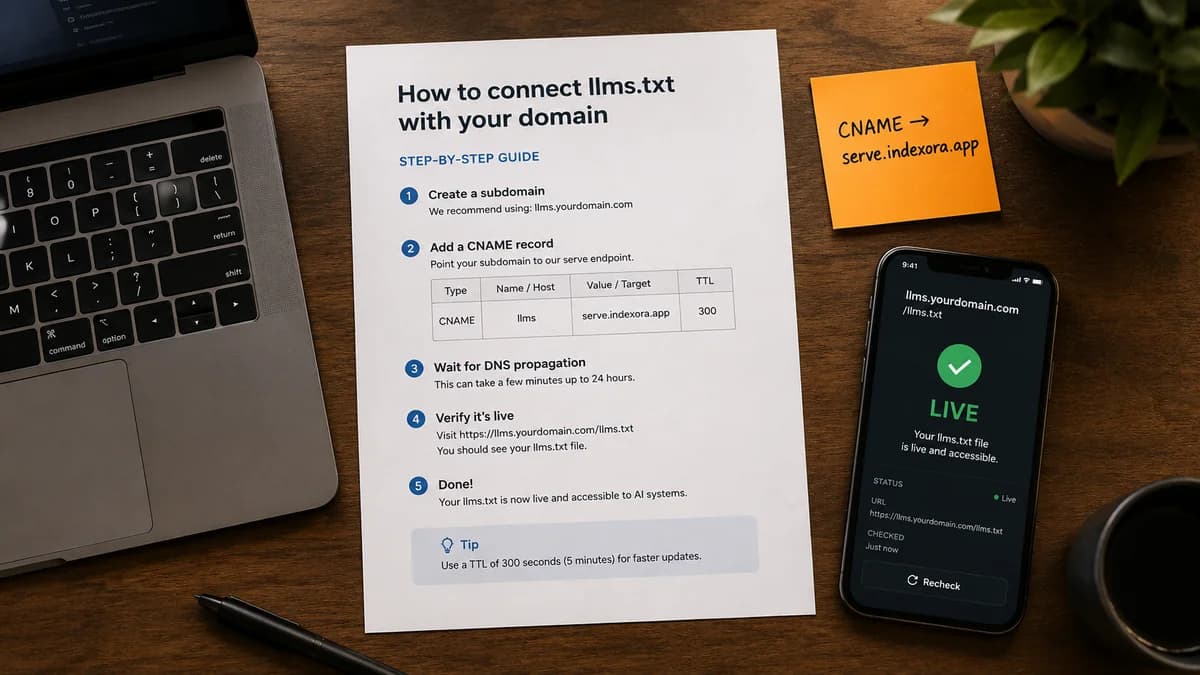
Most websites don't have a llms.txt file. That's a problem, because AI engines — ChatGPT, Perplexity, Claude, Gemini — are increasingly using it as the first thing they check when deciding how to understand and cite a site.
This guide covers what the file actually contains, why placement matters, and the two ways to add it: the traditional method and a faster approach that works without touching your server at all.
What llms.txt actually is
It's a plain text file at the root of your domain. When an AI agent or LLM-powered search tool visits your site, it checks for yourdomain.com/llms.txt — the same way it checks for robots.txt — and uses the contents to understand what your site is about.
A basic llms.txt looks something like this:
# Indexora

> AI discoverability platform for SEO professionals and website owners.

## What this site is about
Indexora helps websites become visible to AI engines like ChatGPT, Perplexity, and Claude. We provide GEO scores, AI visibility audits, and hosted AI files.

## Key resources
- [How it works](/how-it-works)
- [GEO Score](/): Free AI discoverability scan
- [Pricing](/pricing)

## Contact
- Email: [email protected]
The format is Markdown. The content is structured information about your organization, what you do, who you serve, and what pages matter. AI engines use it to build a contextual understanding of your site before they even crawl individual pages.
Why placement matters
llms.txt must be at the root of your domain — yourdomain.com/llms.txt — not in a subdirectory, not on a subdomain.
This is where AI crawlers look for it by convention. If it's not there, it doesn't exist as far as those systems are concerned. Getting the content right is only half the problem. Getting it served at the right URL is the other half.
This is where most people get stuck.
Method 1: Upload it to your server
If you have direct access to your web server or your hosting control panel, this is straightforward:
- Create the file locally as
llms.txt - Upload it to the root of your web directory (the same folder that contains your
index.html) - Verify it's accessible at
yourdomain.com/llms.txt
Works with: Apache, Nginx, any server with SSH/FTP access, Netlify, Vercel (via a public/ folder), GitHub Pages.
Doesn't work easily with: Shopify, most WordPress hosts without cPanel access, Squarespace, Wix, or any platform where you don't control the file system directly.
If you're on a managed platform, this method often requires a plugin or workaround — and even then, some platforms don't support serving arbitrary files at the root.
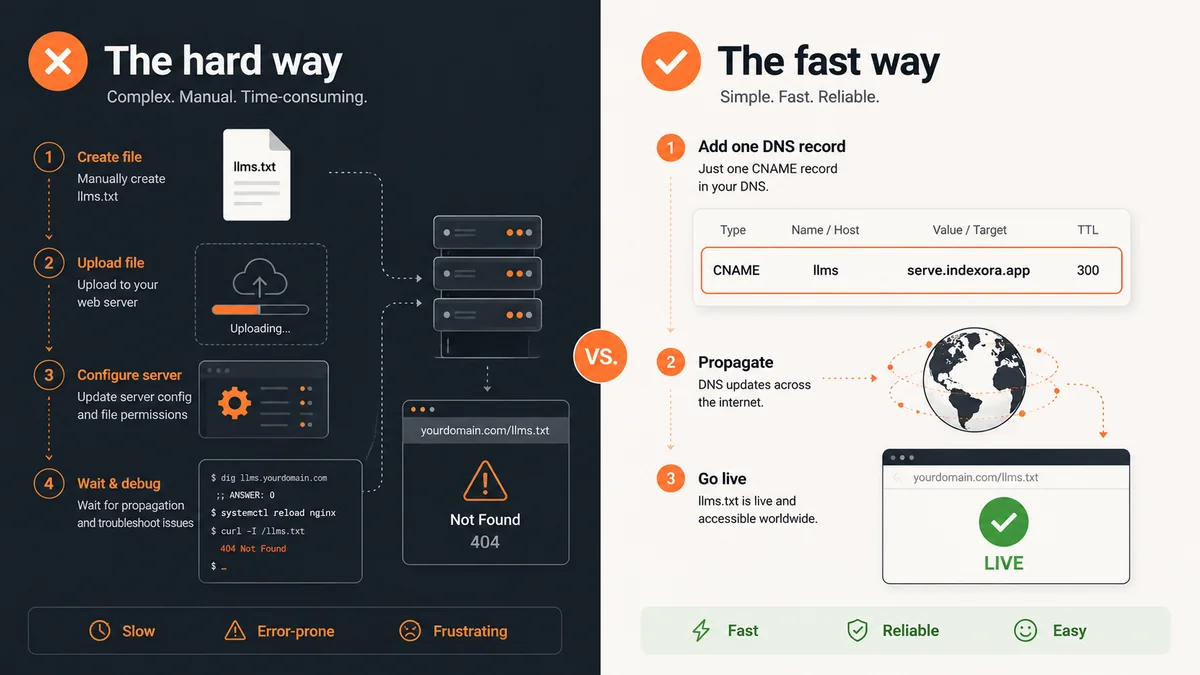
Method 2: One DNS record (no server required)
This is the approach Indexora uses with its Hosted Files product, and it's why most users are live in under 5 minutes regardless of what hosting platform they're on.
The setup works at the DNS level, not the server level. You add a CNAME record at your registrar that points your domain to Indexora's servers. Indexora then serves your llms.txt (and any other AI visibility files) at your root domain on your behalf.
Because it happens in DNS, your existing hosting setup is completely untouched. The CNAME only intercepts specific file paths — /llms.txt, /robots.txt, etc. — and routes them to Indexora's edge network. Everything else continues to work exactly as before.
The setup
- Scan your site at indexora.app — this generates your
llms.txtcontent based on your actual site - Subscribe to Hosted Files (from $2.99/mo)
- In your DNS settings, add:
CNAME @ serve.indexora.app - Files are live within minutes
That's it. No SSH, no file uploads, no code changes. Works with GoDaddy, Namecheap, Route 53, Google Domains, Cloudflare — any registrar that supports CNAME records (which is all of them).
What to put in your llms.txt
The content matters almost as much as the placement. A file that just says your company name isn't very useful. A well-constructed file gives AI engines the context they need to accurately describe and cite your site.
Good llms.txt files typically include:
Your organization
- Name, description, what you do, who you serve
- Your primary location if you're a local or regional business
- Founding date and any relevant credentials
Key pages with purpose
- Don't just list URLs — explain what each page is for
- Prioritize pages that answer questions AI users are likely to ask
- Include your most important product or service pages
Contact and social
- Email, phone (if appropriate)
- Primary social profiles — these help AI engines link your entity across platforms
What you don't want AI to do
- If there are sections of your site you'd prefer AI not to summarize or reproduce, you can note them here (though this is advisory, not enforceable like robots.txt)
The content is only part of it
llms.txt is one file in a broader set that AI engines use. The complete picture includes:
robots.txt— controls which crawlers can access which pagessitemap.xml— helps AI map your content structureai-index.json— a machine-readable index of your key content- JSON-LD schema — structured data embedded in your pages
Getting llms.txt live is a good first step. Getting all of them live and kept current is what moves the needle on actual AI discoverability.
Indexora generates all 12 files from a single scan and hosts them at your domain via the CNAME method above. If you want to check your current AI discoverability before setting anything up, the free GEO score scan takes about 30 seconds.