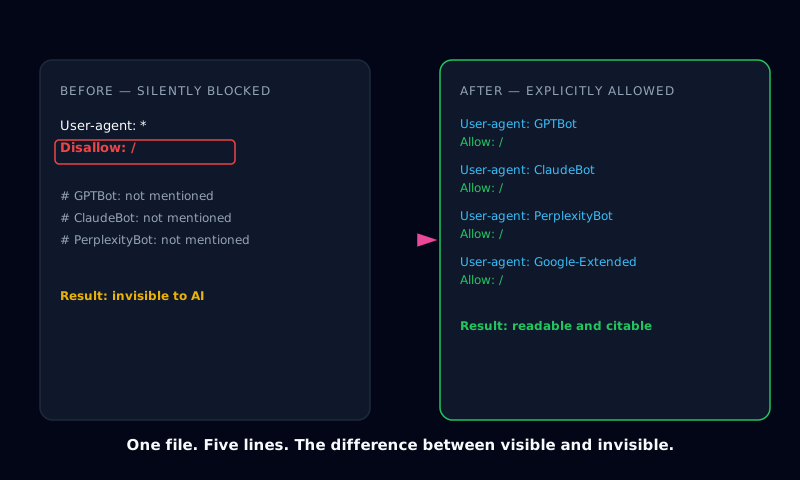
Open a terminal and type curl yoursite.com/robots.txt. Most business owners have never done this. GPTBot might be explicitly disallowed. So might ClaudeBot, PerplexityBot, and Google-Extended, and nobody would know, because nothing about the site looks broken. It loads fine. Google still indexes it. The only thing missing is every AI answer engine that's supposed to be reading it.
Indexora's GEO Score Analyzer checks crawler access as one of its eight scoring categories, and it's the single most common failure across the sites it scans. Not because owners deliberately blocked AI. Because almost nobody checks.
The block usually isn't intentional
Three things cause it, in roughly this order of frequency. A CMS ships a default robots.txt with User-agent: * / Disallow: / and nobody edits it before launch. A security plugin (Wordfence, iThemes, Sucuri) gets configured to "block bad bots" and treats anything with "bot" or "GPT" in its user-agent string as malicious. Or someone copy-pasted a robots.txt template from a decade-old SEO guide that was written before GPTBot existed and never got updated.
None of these are malicious decisions. They're defaults nobody revisited once AI crawlers became something worth caring about.
robots.txt blocking and firewall blocking are different problems
This distinction trips up almost everyone who tries to fix it themselves. robots.txt is a directive: a request the crawler can choose to honor. GPTBot, ClaudeBot, and PerplexityBot are run by companies with a reputational interest in respecting it, so in practice they do. That's the good news.
The bad news: a firewall or security plugin operating at the server level doesn't ask permission. Cloudflare's Bot Fight Mode, Wordfence's "block fake crawlers" setting, and similar tools return a hard 403 before the request ever reaches robots.txt. A site can have a perfectly permissive robots.txt and still be completely unreachable to GPTBot, because the block is happening one layer below it.
Fixing robots.txt alone, in that case, changes nothing. The firewall never checked robots.txt to begin with.
The fix isn't deleting robots.txt
Some owners, once they realize this, overcorrect. They delete the file entirely or blanket-allow every user-agent with no structure. That's not the fix either. A working AI-crawler robots.txt lists each crawler explicitly:
User-agent: GPTBot
Allow: /

User-agent: ClaudeBot
Allow: /

User-agent: PerplexityBot
Allow: /

User-agent: Google-Extended
Allow: /

User-agent: CCBot
Allow: /
Explicit allow lines, one per bot, are more reliable than a single wildcard rule, since different crawlers parse wildcards inconsistently, and an explicit line removes any ambiguity. Real security (rate limiting, WAF rules, actual bad-actor blocking) belongs in server configuration, not in the file that's supposed to be inviting AI engines in.
Checking access takes 30 seconds. Confirming it worked takes longer
Reading robots.txt tells you whether the door is open. It doesn't tell you whether anyone walked through it, or whether ChatGPT actually mentions the business when someone asks a relevant question. Those are two different problems, and most "AI SEO" advice online stops at the first one.
Indexora's AI Visibility Kit generates a ready-to-upload robots.txt with every major AI crawler explicitly allowed, alongside the other files (llms.txt, schema markup, an AI-readable site index) that determine whether an open door actually leads anywhere useful. The daily citation check that ships with paid plans goes a step further: it queries ChatGPT, Claude, Gemini, and Perplexity directly and checks whether the domain gets mentioned, which is the only way to know if "allowed" turned into "cited."
What to actually do
Check the file first, before anything else. Visit yourdomain.com/robots.txt. If User-agent: * is followed by Disallow: / with no explicit Allow line for GPTBot underneath it, that's the block. Fix it before touching anything else. If the robots.txt already looks fine and crawlers are still not showing up in server logs, the problem has moved one layer down, into a security plugin or firewall rule that needs its own review.
Everything else about AI visibility (good schema, a solid llms.txt, accurate business data) is irrelevant until the crawler can physically reach the site.
Frequently Asked Questions
How do I know if GPTBot is blocked on my website?
Check your robots.txt file directly by visiting yourdomain.com/robots.txt in a browser or running curl yourdomain.com/robots.txt from a terminal. If you see User-agent: * followed by Disallow: / with no explicit Allow line for GPTBot beneath it, GPTBot is blocked. A security plugin can also block it at the firewall level even if robots.txt allows it, so a clean robots.txt file doesn't fully guarantee access.
Does blocking AI crawlers protect my website from being copied? No. Blocking GPTBot or ClaudeBot in robots.txt doesn't stop anyone from viewing or copying public pages manually. What it does is remove the business from the pool of sources ChatGPT, Claude, Perplexity, and similar tools can cite when answering questions in that category.
What's the difference between robots.txt blocking and firewall blocking of AI bots? robots.txt is a request a crawler can choose to respect. Reputable crawlers like GPTBot generally honor it. A firewall or security plugin block, like Cloudflare's Bot Fight Mode or Wordfence, is a hard block at the server level that returns an error regardless of what robots.txt says. Many sites that appear to allow AI crawlers in robots.txt are still blocking them through security software.
Which AI crawlers should I allow in robots.txt? At minimum: GPTBot and OAI-SearchBot (OpenAI), ClaudeBot and anthropic-ai (Anthropic), PerplexityBot (Perplexity), Google-Extended (Google's AI systems), and CCBot (Common Crawl, which several AI models train on). Each needs its own explicit Allow line, since a single wildcard rule doesn't reliably cover every crawler's parser.
Will allowing AI crawlers hurt my search rankings? No. Allowing AI crawlers in robots.txt has no effect on Google or Bing rankings, since those use separate crawlers governed by their own directives. Allowing GPTBot, ClaudeBot, and similar bots only affects whether AI answer engines can read and potentially cite the site.