Roughly four in ten websites run on WordPress, and almost none of them have a file called llms.txt. Not because the owners decided against it. Because nothing in their stack has ever asked for one.
Yoast writes a sitemap. RankMath writes a robots.txt panel. Both do their jobs well, for the job they were built for: Google's crawler, circa the last fifteen years of search. Neither one was built with GPTBot in mind, because GPTBot didn't exist when either plugin's core architecture was designed. The gap isn't a bug. It's just a category neither tool was ever asked to cover.
The default WordPress robots.txt says nothing about AI
Install WordPress today and the virtual robots.txt it generates on the fly contains exactly two lines: a wildcard User-agent: * and a disallow rule for /wp-admin/. That's it. No mention of GPTBot, ClaudeBot, anthropic-ai, PerplexityBot, or Google-Extended, the crawlers that actually feed ChatGPT, Claude, Perplexity, and Google's AI Overviews. A wildcard rule technically allows them by omission, which sounds fine until a security or firewall plugin gets involved.
Plugins like Wordfence and iThemes Security ship bot-blocking features designed to stop scrapers and comment spam. Several of them apply broad user-agent blacklists or aggressive rate limiting that doesn't distinguish a legitimate AI crawler from a malicious one, unless the site owner has specifically gone in and allow-listed it, which requires knowing the crawler names exist in the first place. A site can look perfectly open in a standard SEO audit and still be quietly blocking the exact traffic it needs for AI visibility.
Yoast's schema doesn't answer the question AI models ask
Yoast and RankMath both output solid Organization and Article schema, enough to satisfy Google's rich-results requirements. But an AI model generating an answer isn't running a rich-results test. It's trying to extract a fact: what does this business do, where is it located, what does it offer, and can this be stated with confidence. That's a different question than "does this page qualify for a FAQ rich snippet," and it needs a different kind of file to answer it: one written in plain, structured language a model can lift a fact from without ambiguity.
llms.txt exists specifically for this. It's a plain-text Markdown summary of the site (what the business does, its key pages, its technical details) sitting at the domain root the same way robots.txt does, discoverable by any crawler without configuration. None of the major WordPress SEO plugins generate one, because none of them were built after the standard existed widely enough to prioritize it.
The plugin ecosystem assumes a human is reading the results
Every WordPress SEO plugin's dashboard is built around a green checkmark for the site owner: readability score, keyword density, internal link count. That feedback loop makes sense when the audience is a human editor deciding whether a post is ready to publish. It doesn't map cleanly onto AI readiness, where the actual test is binary and invisible: either a model cites the site in an answer, or it doesn't, and there's no dashboard widget in a standard SEO plugin that tells you which.
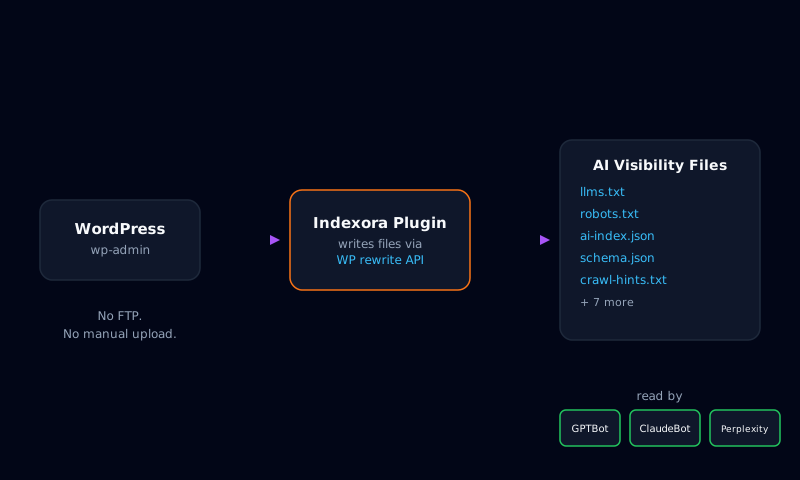
This is the specific problem Indexora's WordPress plugin was built to close. Instead of adding another dashboard of scores, it writes the AI visibility file set (llms.txt, ai-index.json, crawl-hints.txt, security.txt, schema.json, and the rest) directly through WordPress's own file and rewrite APIs, the same mechanism Yoast uses to serve its sitemap. No FTP, no manual root-directory upload, no editing .htaccess by hand. Install the plugin, connect it, and the files exist at the paths AI crawlers already check for by convention.
What this actually costs to fix
The honest version of "fix this" for a WordPress site: confirm robots.txt explicitly allows the named AI crawlers rather than relying on a wildcard, check whether a security plugin is silently blocking them, and add the files that don't exist yet, llms.txt chief among them, since it's the first thing several AI crawlers check for. None of that requires touching a database or rebuilding a theme. It requires the files existing, and a plugin that writes them the way WordPress already expects plugins to write things.
The gap here isn't a failure of any individual plugin doing its job badly. It's a category of question (is this site legible to a language model) that the WordPress SEO ecosystem hasn't caught up to yet. Checking whether a site answers it takes about as long as running a normal SEO audit already does.
Frequently Asked Questions
Does Yoast SEO or RankMath handle AI crawler access? No. Both plugins manage a robots.txt panel and generate a sitemap, but neither ships default Allow rules for GPTBot, ClaudeBot, PerplexityBot, or Google-Extended, and neither generates llms.txt or AI-specific structured data. They were built for traditional search indexing, not generative engines.
Will a security plugin block AI crawlers by default? Some will. Bot-blocking and firewall plugins that ship an aggressive default ruleset can catch AI crawlers in the same net as scrapers and spam bots, since many of them don't distinguish GPTBot or ClaudeBot from malicious traffic unless specifically configured to allow them.
Do I need to touch code to fix this on WordPress? No. A WordPress-specific plugin can write the AI visibility files (llms.txt, ai-index.json, crawl-hints.txt, and the rest) directly through WordPress's own file and rewrite APIs, the same way Yoast writes its sitemap, without FTP or manual uploads.
How is this different from a normal SEO plugin? A normal SEO plugin optimizes for how Google's crawler indexes and ranks pages. An AI-visibility plugin optimizes for a different consumer entirely: a language model reading the site once, at generation time, deciding whether to cite it in an answer. The signals it needs (llms.txt, machine-readable business facts, explicit crawler permissions) mostly don't exist in a standard SEO plugin's output.